Black Friday and Cyber Monday pack a huge share of holiday shopping into just a few days, and every brand chases the same shoppers at the same moment. Inboxes overflow, ad costs climb, and shoppers make decisions fast. The brands that win reach their audience instantly, with the right offer, before a competitor gets there first.
Push notifications give you that direct line. They land on a subscriber’s screen in seconds, they skip the crowded inbox, and they don’t depend on an algorithm or an ad auction to reach people. When you plan them well, they drive traffic during the moments that matter most and keep paying off long after the sales end.
This guide walks you through a complete strategy for Black Friday push notifications. You’ll learn when to start Black Friday planning, how to grow your subscriber list before the rush, how to measure results, and how to keep new subscribers engaged after Cyber Monday.
Key Takeaways
- Push notifications give you a direct line to shoppers on Black Friday. They deliver instantly, appear right on the screen, and reach subscribers who already chose to hear from you.
- Use push, email, and SMS together. Let email handle detailed content, save SMS for your highest-value moments, and use push for real-time alerts like flash sales, countdowns, and price drops.
- Start planning at least eight weeks before Black Friday. Early planning gives you time to grow your list, build automations, and test every message before the rush.
- Grow your subscriber list before the sale begins. Lead with a clear value proposition, use a soft prompt, place opt-ins on high-intent pages, and offer an exclusive Black Friday incentive.
- Prepare your site for sudden traffic spikes. Load test ahead of time, stagger large sends, link to specific landing pages, and keep inventory in sync with your notifications.
- Measure what drives revenue, not just clicks. Track conversions, revenue per notification, and opt-out rates, and adjust your campaign in real time during the sale.
- Keep subscribers engaged after Cyber Monday. Scale back your send frequency, personalize messages based on holiday behavior, and offer value beyond discounts to turn holiday shoppers into year-round customers.
What is Black Friday Cyber Monday and when is it in 2026?
Black Friday Cyber Monday is the four-day shopping stretch that runs from the day after Thanksgiving through the following Monday. In 2026, Black Friday falls on November 27, and Cyber Monday falls on November 30.
Black Friday started as an in-store event, with retailers opening early and offering doorbuster deals to kick off the holiday season. Cyber Monday followed as the online counterpart, giving shoppers a day to hunt for deals from their computers once they returned from the long weekend. Today, the line between the two has mostly disappeared. Shoppers buy online all weekend, and most brands run one continuous promotion across all four days.
Key dates for 2026:
- Thanksgiving: Thursday, November 26
- Black Friday: Friday, November 27
- Small Business Saturday: Saturday, November 28
- Cyber Monday: Monday, November 30
- Giving Tuesday: Tuesday, December 1
The weekend itself tells only part of the story. Many retailers now launch early-access deals in the first weeks of November, and some extend offers into a full Cyber Week after Monday. For your push strategy, that means the campaign window stretches well beyond four days, so your planning needs to cover the lead-up and the follow-through.
Why do Black Friday push notifications work so well?
Black Friday push notifications work because they reach shoppers instantly, in a place they actually look, at the exact moment a deal goes live. When every brand competes for attention over the same few days, speed and visibility decide who gets the click.
Delivers in real time. Black Friday moves fast. Flash sales start and end within hours, popular items sell out, and prices change throughout the weekend. Black Friday push notifications let you announce a deal the second it launches and tell shoppers when it’s about to end, so your message arrives while the offer still matters.
Shows up where shoppers already are. A push notification appears directly on a subscriber’s screen, whether they’re on their phone or at their desk. It doesn’t sit in a promotions tab or get buried under dozens of other holiday emails. Shoppers see it, and they decide in a single glance whether to tap.
Reaches an audience that already said yes. Every push subscriber chose to hear from you. That opt-in signals real interest in your brand, which makes these shoppers more likely to act on a well-timed offer than a cold audience you reach through ads.
Fits the urgency of the moment. Push copy stays short by design. A clear headline, a strong offer, and a direct call to action match exactly how shoppers behave during Black Friday: they scan, compare, and buy quickly. Countdown messages and “last chance” alerts feel natural in this format.
Powers automated, personal messages. Push goes beyond broadcast blasts. You can trigger notifications when a subscriber abandons a cart, when an item they viewed drops in price, or when a sold-out product comes back in stock. During Black Friday, these timely nudges recover sales you would otherwise lose to a competitor.
Doesn’t require personal contact details. Shoppers can subscribe to web push with a single click, without handing over an email address or phone number. That low barrier makes it easier to build an audience quickly in the weeks before the sales start.
Push notifications vs. email vs. SMS: which is best for Black Friday?
No single channel wins Black Friday on its own. Email, SMS, and push notifications each do a different job, and the strongest strategies use all three together. Push stands out for speed and real-time alerts, email handles detailed content and storytelling, and SMS delivers a personal touch for your most engaged customers.
Push Notifications | SMS | ||
Delivery speed | Instant | Fast, but often read later | Instant |
Where it lands | Directly on the screen | Inbox, often the promotions tab | Text message inbox |
Message length | Short headline and body | Long, with images and layouts | Short text, optional media |
What subscribers share | A single click to opt in | Email address | Phone number and explicit consent |
Cost to send | No per-message cost on most platforms | Low | Per-message fees |
Best Black Friday use | Flash sales, countdowns, cart and price-drop alerts | Gift guides, full catalogs, early-access announcements | VIP offers and reminders |
Use email to set the stage. Email gives you room to show full product lineups, build gift guides, and explain your offers in detail. Send it ahead of the sale to build anticipation and give shoppers time to plan their purchases.
Use SMS for your highest-value moments. Text messages feel personal and get noticed quickly, but subscribers guard their phone numbers closely, and per-message costs add up. Save SMS for your most loyal customers and your most important announcements.
Use push for speed and volume. When a flash sale goes live, an item restocks, or a deal enters its final hours, Black Friday push notifications get the message out immediately without driving up your costs. It handles the frequent, time-sensitive updates that Black Friday demands.
Coordinate the channels instead of repeating yourself. Sending the same message on all three channels at once wears out your audience. Plan each channel’s role in advance, stagger your sends, and let each one push shoppers toward the same goal from a different angle.
When should you start planning Black Friday push notifications?
Start planning your Black Friday push notifications at least eight weeks before the sale, which puts your starting point in early October for 2026. That gives you enough time to grow your subscriber list, build automations, write and test your messages, and coordinate with the rest of your marketing team before the rush begins.
Here’s how to break that window into phases:
Eight or more weeks out (late September to early October):
- Set clear goals for the campaign and decide which metrics you’ll use to judge success
- Review your current subscriber list, confirm your opt-in prompts work on every device, and sync with your merchandising team on which offers you’ll promote and when
Four to six weeks out (mid to late October):
- Focus on subscriber growth so you enter the holiday season with the largest audience possible
- Build your segments, set up automated messages like cart abandonment, price drop, and back-in-stock alerts, and start drafting copy and creative for each send
Two to three weeks out (early to mid November):
- Finalize your send calendar and schedule your teaser and early-access campaigns
- Test every notification across browsers and devices, confirm your links and landing pages work, and make sure your site can handle a spike in traffic
The week of the sale (November 23 to 30):
- Execute your plan and watch performance closely
- Adjust send times, pause messages that underperform, and react quickly when inventory sells out or a new deal launches
After Cyber Monday (December 1 onward):
- Shift your focus to keeping your new subscribers engaged through the rest of the holiday season and into the new year
Starting late? Prioritize
If you’re reading this with only a few weeks to implement Black Friday push notifications, focus on three things:
- Turn on subscriber opt-in prompts right away
- Set up your most valuable automations
- Build a simple send calendar around your biggest offers.
How do you get more push subscribers before Black Friday?
Get more push subscribers before Black Friday by giving visitors a clear reason to opt in, asking at the right moment, and promoting your notifications everywhere your audience already sees you. The weeks leading up to the sale offer your best chance to grow, because shoppers actively look for ways to catch the best deals first.
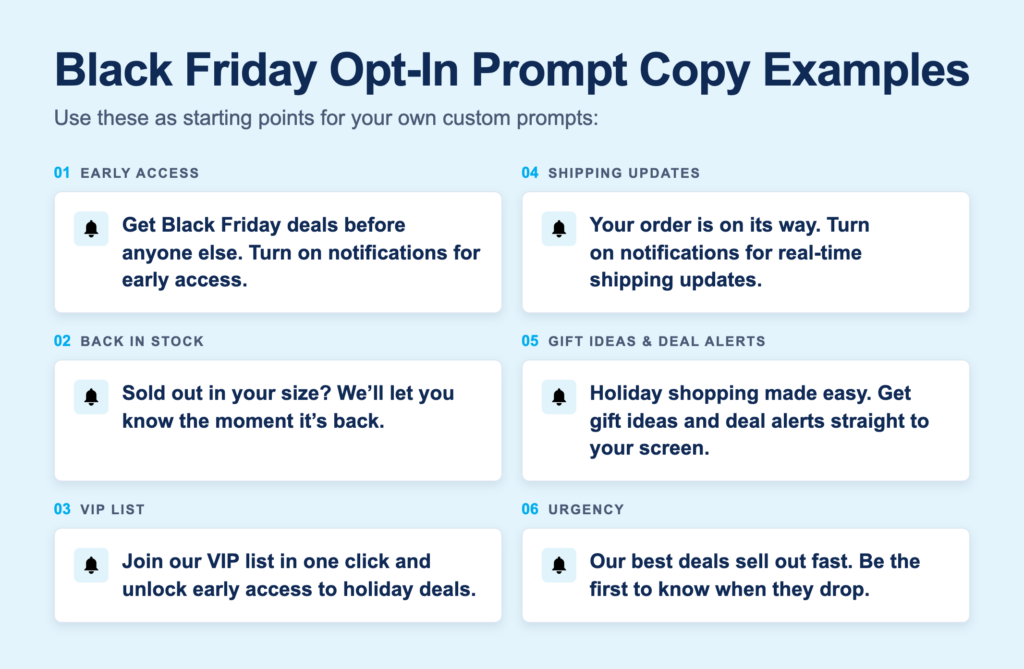
Lead with a clear value proposition. Shoppers won’t subscribe just because you ask. Tell them exactly what they’ll get: early access to Black Friday deals, alerts when prices drop, or a heads-up before popular items sell out.
Use a soft prompt before the browser prompt. Show your own custom message first, and only trigger the browser’s native permission prompt when a visitor clicks to accept. If a visitor declines the native prompt, the browser blocks you from asking again. A soft prompt protects that one chance and lets you explain your value in your own words.
Time your prompt around engagement. Don’t ask the instant someone lands on your site. Wait until a visitor scrolls, views a second page, or spends time on a product.
Place prompts on high-intent pages. Product pages, category pages, and wishlists attract shoppers already thinking about buying. Add “notify me” options to out-of-stock items and “alert me when the price drops” buttons on popular products. These contextual opt-ins feel helpful instead of pushy.
Offer an exclusive Black Friday incentive. Promise subscribers something they can’t get anywhere else, such as early access to your sale, a subscriber-only discount code, or a first look at your doorbuster deals.
Promote push across your other channels. Mention your Black Friday push notifications/ alerts in your emails, social posts, and on-site banners. Shoppers who already follow you elsewhere make strong candidates for push, and reaching them on another channel gives you one more way to connect during the sale.
Test your prompts before the rush. Try different copy, designs, and timing in October so you know what works before traffic peaks. Check how opt-in works on every major browser and operating system, since requirements differ.
How do you prepare your site for Black Friday push traffic?
Prepare your site for Black Friday push traffic by making sure it can handle sudden spikes, sending subscribers to fast and focused landing pages, and removing every obstacle between the click and the checkout. A great notification loses its value the moment a shopper taps it and hits a slow page, a broken link, or a sold-out product.
Plan for sudden traffic spikes. Push notifications reach your entire audience within seconds, so visitors arrive all at once instead of gradually. Share your send calendar with your development and hosting teams, run load tests ahead of time, and confirm your servers and content delivery network can scale quickly when a big send goes out.
Stagger your largest sends. If your subscriber list is large, send major campaigns in batches spaced a few minutes apart rather than all at once. Staggering spreads the traffic out, protects site performance, and still gets your message to everyone within a short window.
Optimize for mobile speed. Many subscribers will tap your notifications from their phones. Compress images, trim unnecessary scripts, and test every landing page on mobile devices to make sure it loads quickly and displays cleanly on smaller screens.
Test every link and tracking parameter. Click through each scheduled notification before it goes live. Confirm the links work, the landing pages match the offer, and your tracking parameters capture the data you need to measure results.
How do you measure the performance of Black Friday push notifications?
Measure the performance of Black Friday push notifications by tracking how many subscribers click, how many of those clicks turn into sales, and how much revenue each campaign generates. Pair those results with subscriber growth and opt-out data to see the full picture of what worked, what didn’t, and how your campaign affected your audience.
Set your baselines before the sale. Pull your typical click-through rates, conversion rates, and opt-out rates from the months leading up to Black Friday, along with your results from last year’s holiday campaign if you have them. Baselines give you a clear point of comparison so you can tell whether a result signals success or just reflects normal performance.
The Push Notification Metrics That Matter Most
Track these core metrics for every notification and automation:
- Click-through rate (CTR): The percentage of subscribers who click a notification after receiving it. CTR tells you whether your message and offer grabbed attention.
- Conversion rate: The percentage of clicks that end in a purchase. Conversion rate tells you whether your landing page and offer delivered on the notification’s promise.
- Revenue per notification: The total revenue a notification drives divided by the number of subscribers who received it. This metric lets you compare the value of different messages, regardless of audience size.
- Average order value (AOV): The average amount shoppers spend per order after clicking a notification. AOV shows whether your offers encourage larger purchases.
- Unsubscribe rate: The percentage of subscribers who turn off notifications after receiving a message. A rising unsubscribe rate signals that you’re sending too often or sending messages that don’t feel relevant.
- Subscriber growth: The number of new subscribers you gain over a set period. Track this in the weeks before Black Friday to see whether your opt-in efforts work.
- Opt-in rate: The percentage of visitors who subscribe after seeing your prompt. Opt-in rate tells you how well your prompt copy, timing, and placement perform.
How do you keep holiday push subscribers engaged after Cyber Monday?
Keep holiday push subscribers engaged after Cyber Monday by shifting from pure promotions to messages that offer real value. The subscribers you gained during Black Friday joined for deals, so your goal now is to give them a reason to stay once the deals end.
Thank your new subscribers. Send a short message after Black Friday/ Cyber Monday weekend thanking subscribers for shopping with you and letting them know what to expect next. A simple thank-you resets the relationship and signals that your notifications will continue to offer value beyond the big sale.
Scale back your send frequency. Subscribers tolerate frequent messages during Black Friday. Keep that pace going after the sale ends, and you’ll drive opt-outs. Gradually reduce how often you send, and give subscribers some breathing room after an intense few days.
Ride the rest of the holiday season. The shopping doesn’t stop after Cyber Monday. Use push to share last-minute gift ideas, shipping cutoff reminders, gift card options, and end-of-year sales. These messages feel timely and helpful because they solve real problems shoppers face in December.
Segment by holiday behavior. Separate your new Black Friday subscribers from your long-term audience, and group subscribers by what they browsed, clicked, or bought. Someone who purchased a winter coat will respond to different messages than someone who only browsed electronics. Tailored notifications keep your content relevant to each person.
Mix in value beyond discounts. Share new arrivals, product tips, restock alerts, and content that helps subscribers get more from what they bought. When every notification announces a sale, subscribers learn to ignore you until the next one. Variety keeps them paying attention.
Plan ahead for the new year. Map out your push calendar for January and beyond, including clearance sales, new collections, and upcoming shopping moments in 2027 like Valentine’s Day. A clear plan turns your holiday subscribers into a lasting audience you can reach all year.
Start building your Black Friday push notifications strategy today
Black Friday and Cyber Monday reward the brands that reach shoppers first, with the right offer, at the right moment. Black Friday push notifications give you that advantage. They deliver instantly, land directly on your subscribers’ screens, and turn time-sensitive deals into immediate traffic and sales.
A strong push strategy starts long before the sale begins. Plan early, grow your subscriber list in the weeks leading up to Black Friday, and coordinate push with your email and SMS campaigns so each channel plays its own role. Prepare your site to handle sudden traffic spikes, and remember to keep your new subscribers engaged well after Cyber Monday ends.
The work you put in now pays off twice: once during the biggest shopping weekend of the year, and again every time you reach those subscribers in the months that follow. Book a demo with Pushly and start building your plan today. Make this Black Friday the one that grows your audience for the year ahead.
Black Friday push notifications frequently asked questions
How do ecommerce teams measure performance of web push notification analytics?
Ecommerce teams measure web push performance by reading clicks and unsubscribes together on every send, tracking net subscriber growth and active subscribers across the program, and attributing orders and revenue to each notification in their own analytics tool. A holdout group on the main triggered sends proves push caused the revenue rather than coincided with it.
How do ecommerce teams improve revenue impact from web push notifications?
Ecommerce teams improve revenue from web push by wiring cart recovery, browse abandonment, price-drop, and back-in-stock triggers to storefront events, placing the product the shopper viewed in the notification, and attributing every order back to the send. Teams then invest in the triggers that return the most and retire the ones that mostly generate unsubscribes.
Which web push notification software do online retailers usually compare?
Online retailers usually compare OneSignal for a free self-serve start, Pushly for a managed commerce program with revenue attribution, and Braze or Iterable when web push has to fit an existing cross-channel stack. Klaviyo appears on many shortlists but does not send web push natively.
How do marketing teams use push notification platforms to re-engage website visitors?
Marketing teams use push notification platforms to capture a visitor’s permission with one click, record what that visitor viewed, and send the browser a notification later that refers back to the visit: the product left behind, a price change on it, or new arrivals in the category browsed. No email address or account is required.
Which ecommerce push notification platforms best handle both promotional and transactional messages?
Braze, Pushly, and Iterable handle both types of messaging best. Braze and Iterable handle both from one system, running order and shipping updates alongside campaigns under separate rules. Pushly covers promotional and transactional messages for web, app, and in-app on a single shopper profile with a managed strategy team. OneSignal also supports transactional sends through its API, usually for teams with developer time.
Which web push notification platform works best for lifecycle and retention marketing?
Pushly works best for retailers that want web push run as its own retention channel, with behavior-triggered journeys, first-party shopper profiles, and send timing learned per subscriber. Braze and Iterable work best for brands that already run lifecycle journeys across email, SMS, and app and want web push added to that canvas.
Which push notification platform is best for browse abandonment and win-back journeys?
Pushly is the best fit for retailers that want browse abandonment and win-back run as managed, multi-step journeys with product-level personalization and revenue reporting. PushEngage is the practical choice for Shopify and WooCommerce stores that want both flows pre-built at a flat price. Braze suits enterprise brands running the same journeys across every channel.